
Prevention
Job hazard analysis software: evaluate versions, reviews and field use
Evaluate digital JHA software using a real task, current versions, worker reviews, changed conditions and offline delivery, not just a blank form.
By Reldro · · 10 min read
What should job hazard analysis software support?
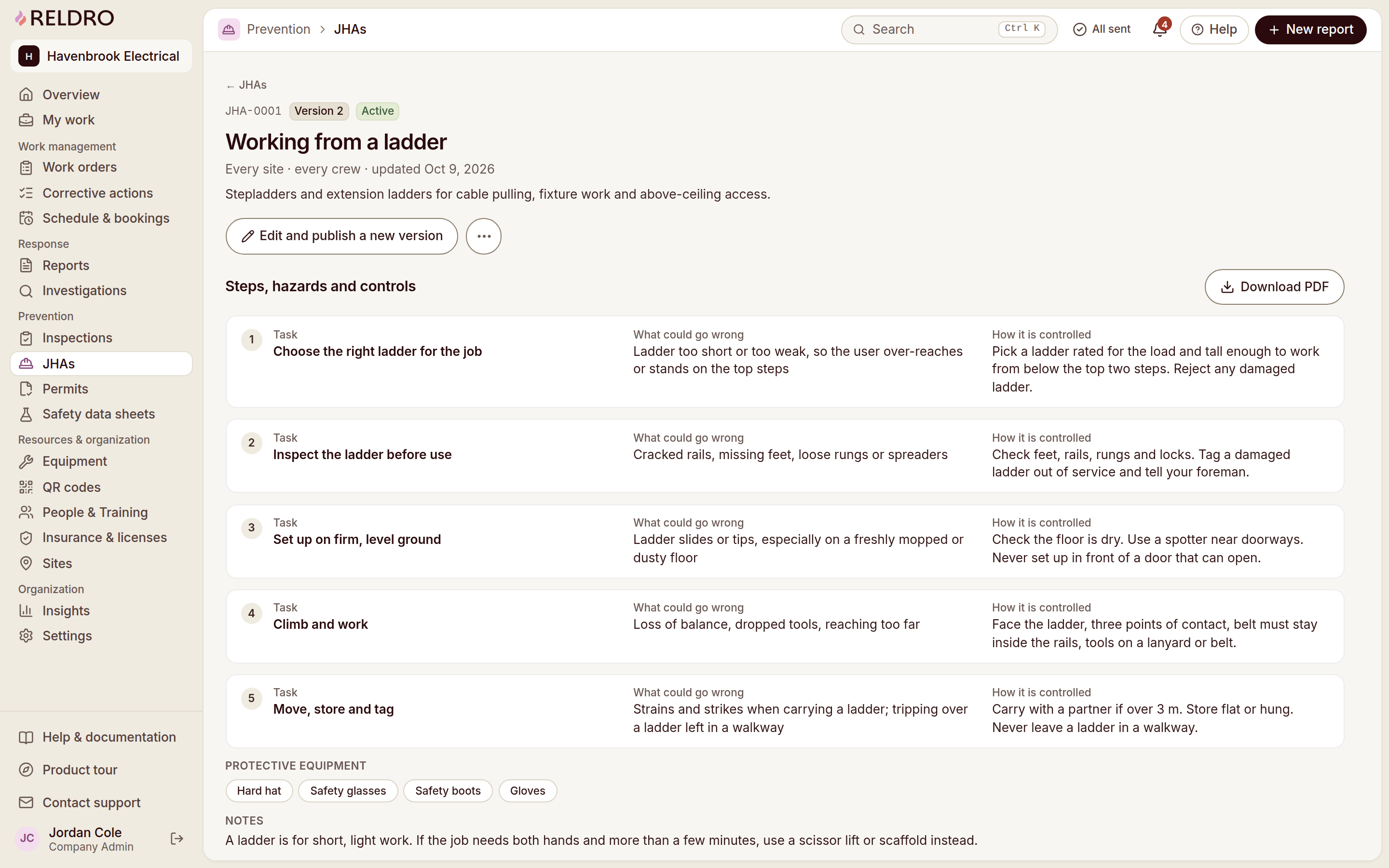
Job hazard analysis software helps your team document task steps, identify associated hazards, record the controls selected by responsible people and retain the review history. The useful output is a task-specific plan that the people doing the work can find and understand, not merely a completed digital form.
OSHA's job hazard analysis booklet describes looking at the relationship between the worker, task, tools and work environment. It is a planning reference, not a substitute for requirements applicable to your trade or a product approval. This guide focuses on evaluating digital record handling, rather than prescribing technical controls.
For a construction contractor, a JHA travels with changing locations, teams, equipment and neighboring work. Evaluate whether the system makes those changes visible and preserves what was actually reviewed. A signature without an identifiable version gives a future reviewer an incomplete record.
Start your evaluation with a real task
Choose a familiar assignment whose procedure your team already reviews. Identify its work area, scope, equipment, team and responsible reviewer. Use approved material and a realistic change scenario. Do not test a system by inventing hazardous work or asking unqualified people to select controls.
Split the task into meaningful steps through the responsible team. A single entry such as install equipment can hide important interfaces, while dozens of trivial movements can make the plan unusable. The appropriate level of detail depends on the actual work, not a software vendor's preferred number of rows.
Ask a supervisor and a field teammate to read the same draft. Can they identify the step, its location and the intended review? Do they understand the terminology? Their questions will reveal whether the form supports the task or simply carries words copied from a template.
Use templates as starting points, not approvals
A template helps organize discussion and remind the team of subjects to consider. It cannot know the current access, equipment, site interfaces or reviewed methods for your assignment. Retain the template's useful structure, then check the content against the actual task.
Reldro's template library includes task-specific JHA examples, and its JHA workflow keeps task steps, hazards and controls together. Preview the relevant template and review it through your company's process before use. Template viewing should not be confused with a promise of a free download or a complete approved plan.
For electrical installation, pipework, roofing or concrete, link the task plan to the relevant work instructions rather than relying on a generic title. If you cannot establish whether a template applies, keep the question visible and ask the responsible person. Filling every field does not resolve that uncertainty.
Check versions and worker review together
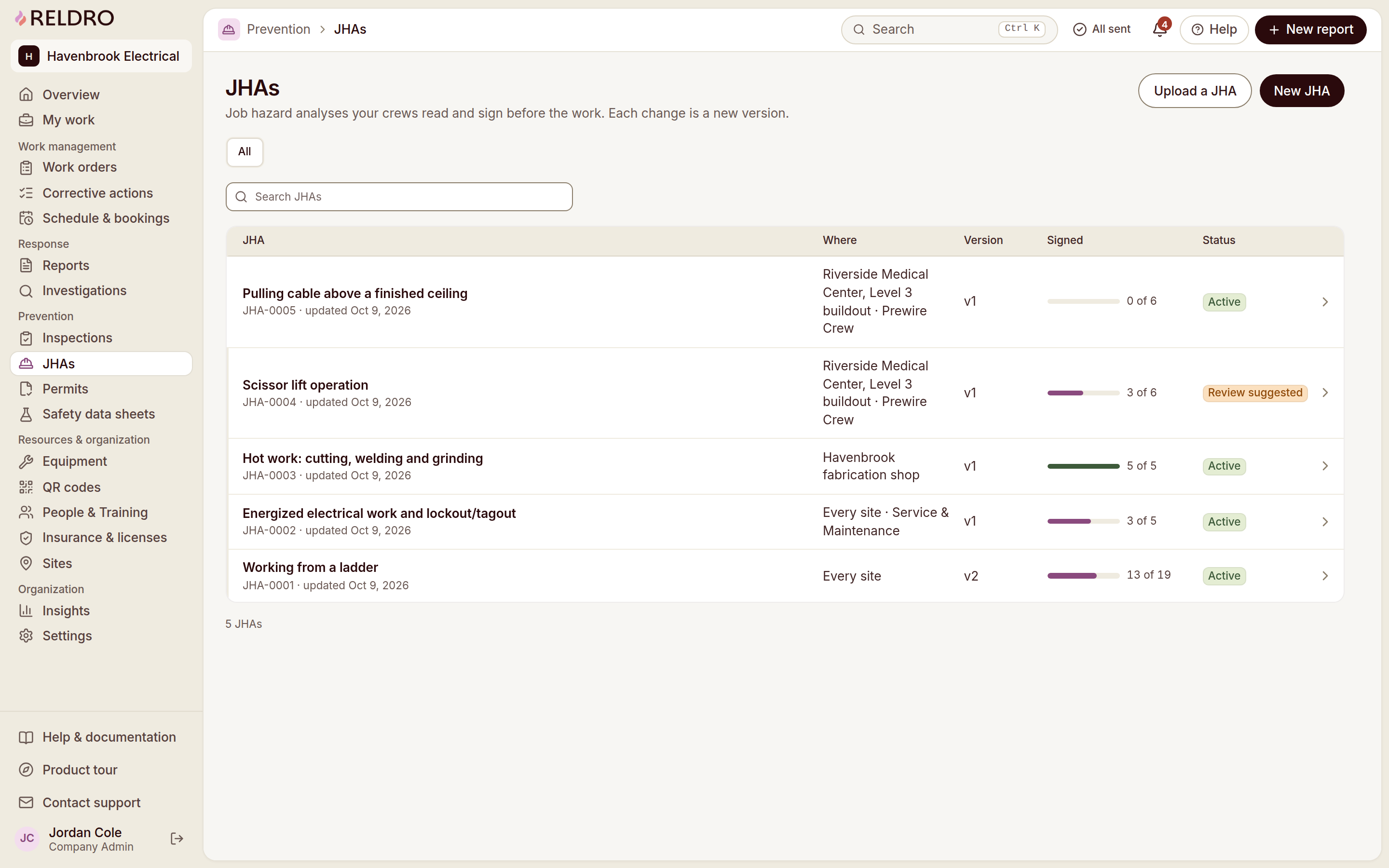
A digital JHA should make the current published wording identifiable and retain the previous record. In Reldro, workers review and sign the current version on their phone, and a new version requires fresh signatures. Test that relationship directly: change a meaningful item and confirm which version the worker sees next.
Do not assume that a saved draft is the published instruction. Ask who can prepare, review and publish changes, and how a supervisor identifies outstanding reviews. The system needs to support the company's responsibilities, not let a convenient editing permission quietly become authority to approve work.
A signature records an acknowledgment within the process. It does not independently prove comprehension, competence or the suitability of the controls. Discuss important changes with the team and follow your appropriate review and authorization arrangements before work proceeds.
| Record or decision | What to establish | Who reviews it |
|---|---|---|
| Task draft | Specific steps, location and reviewed source | Task owner |
| Published version | Wording and revision currently in use | Authorized reviewer |
| Worker acknowledgment | Person and exact version reviewed | Worker and supervisor |
| Changed condition | What changed and who decides the next step | Responsible supervisor |
| Offline entry | Pending versus received status | Field user and office reviewer |
An example of a location change
Illustrative administrative example: a plumbing task moves from one corridor to another after access changes. The supervisor does not rename the old JHA and assume its reviews apply. The responsible team checks the new location, neighboring work, relevant references and any changed task boundaries.
They prepare a revised version through the approved process. Workers review the current wording, and the record retains the earlier version and its acknowledgments. If the new location raises an unanswered access question, it remains an open decision rather than becoming an assumed condition in the plan.
When the office later reviews the assignment, it can identify which location and version the team used. The system does not determine the appropriate controls; it retains the decisions and reviews made by the authorized people.
Use the same scenario during evaluation. Ask the vendor to show the old record, the revised record and the worker's current view. This is a better test than asking whether the system has a version-history feature and accepting a yes.
Connect the JHA to related records without merging them
A JHA identifies the task-specific planning context. An inspection records an observed condition or check. A permit records the applicable review and authorization process. Training records document learning and qualifications. These can be connected without becoming interchangeable.
If an inspection identifies a changed condition, decide through the responsible team whether the task plan needs review. If a permit depends on a JHA, make the reference identifiable. If training is required, retain its basis and reviewer instead of treating the JHA signature as completion of the course.
Reldro supports JHAs alongside work orders, permits, equipment and training. During evaluation, follow one relevant link from each side and confirm it identifies the correct site and record. A link to a large shared folder may still leave the supervisor searching for the actual reference.
Test low-connectivity use before relying on it
Phone access matters when a task is away from reliable connectivity. Reldro supports access to saved pages and completion of JHA signatures offline, with syncing when connectivity returns. Saved on the device is not the same as received by the office.
Test the complete journey with ordinary equipment: save the relevant page, lose connectivity, review the task, complete the permitted record action and reconnect. Check the pending outbox and sent state. Also test what happens if the office publishes a revised version while the device is disconnected; your company needs a process for confirming the current instruction.
Do not claim that offline software keeps all devices current instantly. A downloaded or saved copy may need a new review when conditions or wording change. For urgent danger, follow the site procedure rather than waiting for a signature or report to send.
Evaluate review quality, not just completion counts
A company dashboard can show how many JHAs have been signed, but the count alone does not establish that the right task was planned or that the team understood it. Review a small sample of real records for specific steps, source references, changed conditions and identifiable versions.
Look for repeated generic content that does not describe the actual job. Ask whether reviewers can record unanswered questions and request changes rather than treating every submission as acceptable. A process that only measures completed forms may encourage fast copying instead of a useful discussion.
Where AI assists with a draft, compare the output with approved information and remove unsupported detail. People identify hazards, evaluate controls and own the final plan. An articulate draft is not a finding or technical authorization.
A practical software evaluation session
Run the session with a task owner, a field reviewer and an office reviewer. Give each person a concrete action: prepare the draft, identify the current version, request a change, review the revision and find the history. Keep notes on where the handover becomes unclear.
Check permissions with different accounts rather than watching a vendor use an administrator login for everything. Confirm the record export or retention arrangement your company needs, without assuming that every product offers every format. Ask how records remain available when an assignment closes.
End with the missing information, not a feature score. If the field teammate cannot identify the current wording or the office cannot distinguish an old acknowledgment, those are actionable gaps. Repeat the session after configuration changes before expanding the setup to other sites.
Check how a revision reaches the affected people
Version history is useful only if the people doing the work can identify the instruction that now applies. During evaluation, publish a reviewed change and ask the field user to find it without assistance. Check the version identifier, task location and outstanding acknowledgment, not just whether a notification appeared.
Include somebody who was away when the revision was issued and somebody using a saved page. Your company needs an appropriate briefing and review process for both. A software notification can prompt a review, but it is not proof that the person understood the changed condition or that a previous approval continues to apply.
Ask what a supervisor sees when reviews are incomplete and which role can resolve that state. Avoid treating the easiest configuration as the correct authorization process. The setting should reflect decisions made by the responsible people, not make those decisions implicitly.
If a revision only corrects an administrative detail, retain the reason rather than hide the change. If it affects the task, use the relevant company process to review its significance. Reldro's fresh-signature behavior for new published versions makes acknowledgments identifiable; it does not evaluate the technical effect of the change.
Keep a review note that a later supervisor can understand
A helpful review note explains the basis of a decision without becoming a second task plan. Identify the relevant source, the question addressed and any condition still unresolved. Avoid vague entries such as checked or okay when the record needs a specific explanation.
Suppose a supervisor asks whether a template's equipment wording applies to the item assigned. The reviewer identifies the approved reference and records the clarification. If the answer is not yet established, the record retains the question and the person responsible for obtaining it. The plan should not show a definitive instruction that nobody has verified.
Check how the software retains corrections. A future supervisor may need to know why wording changed between two versions or why a worker's review relates to an earlier task location. The record should preserve that context without exposing unnecessary personal information.
Review note quality is not measured by length. A few specific sentences can be more useful than a copied paragraph repeated across every JHA. Ask the next reader whether they can identify what changed, what source was used and what remains to be decided. Their answer is a practical test of the digital process.
Common questions about digital JHAs
Is JHA the same as JSA? The terms job hazard analysis and job safety analysis are often used for related task-planning methods. Your company and project may define a particular form or process. Use the terminology and requirements applicable to your work rather than assuming one software label settles the scope.
Can you reuse a JHA on another site? Reuse its structure or approved material as a starting point, then review the new task, location and conditions. Do not carry previous signatures over as if people reviewed the new circumstances.
Does a signed JHA replace a permit? No. A task plan and a permit serve different purposes under the applicable work process. Keep the relationship and approvals explicit.
Should every edit trigger a new review? Establish the rule through your company's process and applicable requirements. Reldro's published new versions require fresh signatures; the responsible people still decide how the changed work should be handled.
The takeaway
Evaluate the current task, its version, worker review and changed conditions together. Digital JHA records support accountable planning; the people responsible for the work own the controls and decisions.
Sources and further reading
References for this article, published November 11, 2026. Product scope and requirements can change. Confirm details with the provider and your safety team. Guidance from a specific jurisdiction may not apply to your construction project.