
Prevention
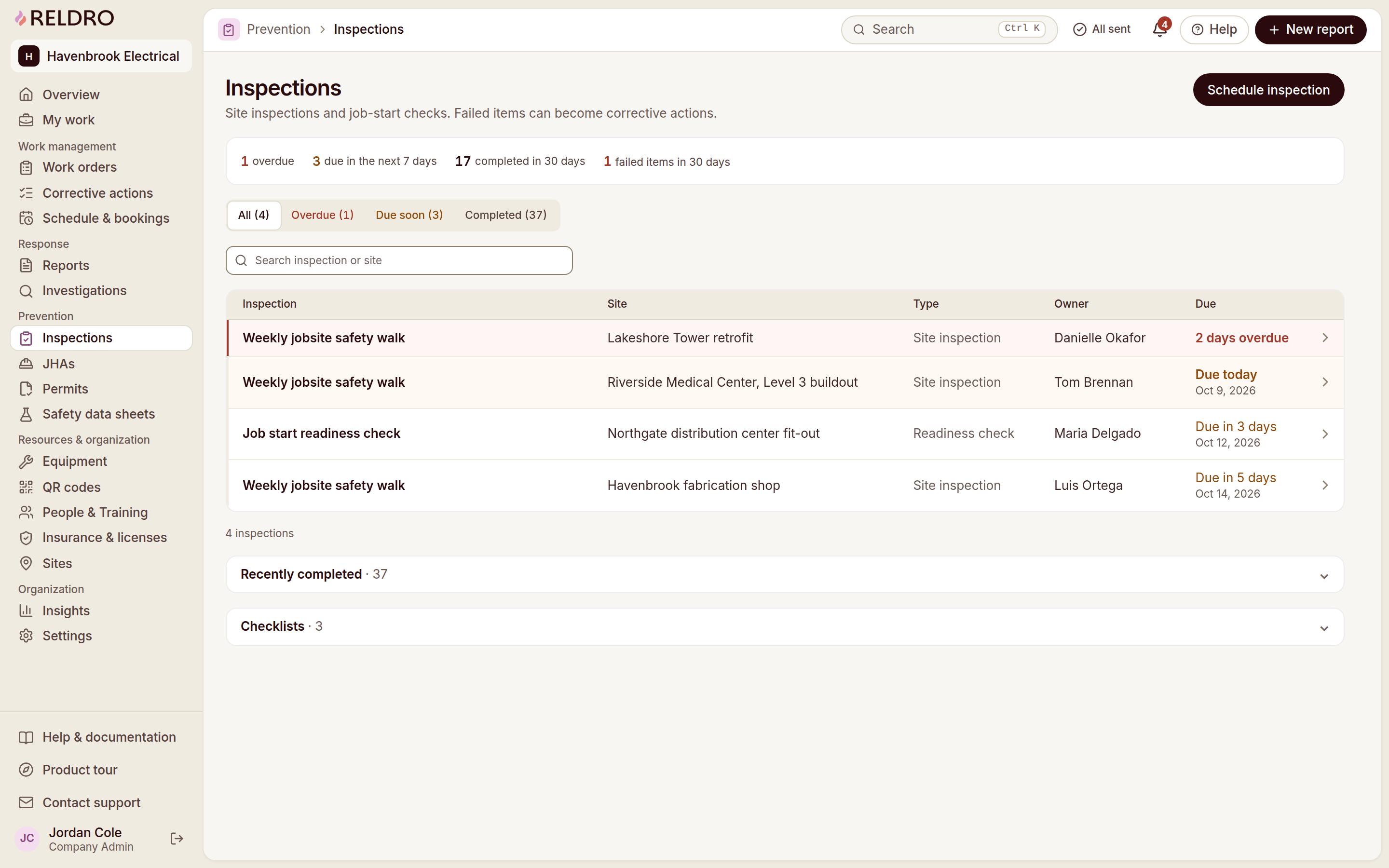
Construction site inspection software: follow findings through review
Evaluate inspection software through checklist setup, field evidence, assigned follow-up and verification across construction sites.
By Reldro · · 10 min read
What should construction inspection software do?
Construction site inspection software helps your team organize checks, record what was observed and retain the follow-up needed for findings. A useful process connects the inspection result to a person, a location and the next decision. A digital checklist that ends at submission may leave the actual problem unmanaged.
Use the system to support the inspections and reviews your competent team identifies for the work. Software does not decide which inspections are legally required, who is qualified to carry them out or what technical acceptance means. Those questions depend on the task, jurisdiction, contract and approved procedures.
This guide is for evaluating that record workflow. The existing checklist guide helps you design relevant questions; the weekly walk guide covers a recurring site-review handover. Keep those purposes separate rather than building another generic checklist page.
Choose a check with a real follow-up history
Select an inspection your company already performs and identify its purpose, scope, source reference and reviewer. Choose an example where a finding previously needed another person's action. It gives you a realistic way to test whether context survives the handover.
Record the site, area, date and applicable checklist version. If the check concerns equipment, identify the actual item rather than a category such as ladder. If it concerns an area, describe how someone else will find it. The evaluation should test the information the next person needs, not only the inspector's ability to tap answers.
Review the form with the competent person responsible for its content. A question may look clear on a large screen yet be ambiguous in the field. If the team does not agree what a pass means, resolve that through the procedure instead of hiding the disagreement behind a yes/no control.
Build questions that separate results from explanations
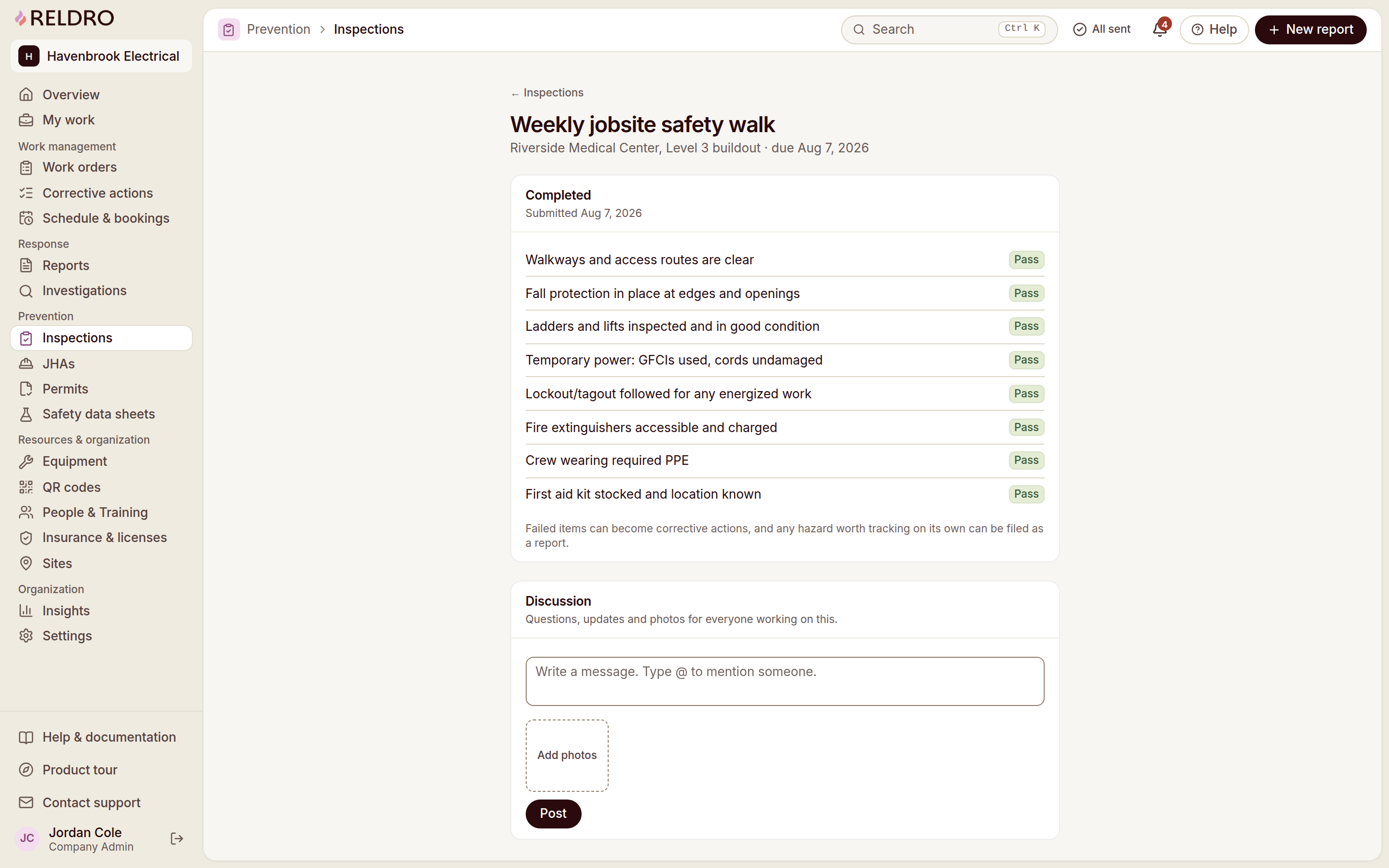
Use questions that match the scope of the inspection. Keep pass, fail and not applicable distinguishable, and allow the inspector to explain the observed condition. A not-applicable answer should not silently become a pass in later reporting.
Reldro inspections support pass, fail and not-applicable responses with notes and photos. A failed item can start a corrective action carrying its evidence and location across. Test this with a representative finding and read the resulting action as someone who was not on the walk.
When importing a checklist or using a library template, review and edit it before use. A familiar title does not establish that the questions fit your trade or current phase. Retain the approved reference so the reviewer can understand what was checked and why.
Capture enough evidence to locate and understand the finding
A photograph should help the reviewer understand the observation, not replace its description. Provide the site, exact area and what the image is intended to show. A close-up may need a wider view, while a wider view may not show the detail that prompted the finding.
Do not photograph people or private information unnecessarily. Follow your site's information-handling and photography arrangements. Describe only what you can establish from the evidence; avoid using a picture as proof of an unseen defect, a cause or another person's intent.
Check the phone upload journey under normal conditions. Can the inspector attach the correct photo and see that the record has reached the office? If connectivity is limited, test the saved and pending states separately. Urgent concerns need the site's immediate-response process, not a delayed form submission.
| Record or decision | What to establish | Who reviews it |
|---|---|---|
| Checklist | Purpose, scope and current reviewed version | Competent content owner |
| Field response | Result, explanation and identifiable location | Inspector |
| Follow-up | Owner, expected result and source evidence | Responsible reviewer |
| Completion | Evidence matching the requested result | Action owner |
| Verification | Acceptance or remaining question | Nominated verifier |
An example of a finding that needs another trade
Illustrative administrative example: a roofing supervisor completes a reviewed area check and records an access arrangement that needs clarification before the next planned visit. The finding includes the project, area and the question for the site coordinator, with a photo explaining the location.
The supervisor does not prescribe an improvised access method in the form. The responsible person reviews the condition and determines the appropriate next step through the site procedure. The resulting action identifies who will obtain the decision and what evidence the reviewer needs before closing the item.
If the next visit moves to a different day, retain the original observation and record the changed arrangement. Updating the schedule is useful, but it should not erase the inspection finding or make an unanswered question appear resolved.
During your evaluation, ask the office reviewer to locate the item without calling the inspector. Their ability to identify the area, source and next owner tells you whether the software retained useful context.
Give each finding a clear response path
Not every result needs the same kind of response. A routine administrative omission, an observed physical condition and an urgent concern may require different people and timing. Define those routes through your responsible team rather than let a default due date decide their seriousness.
For findings needing corrective work, state the expected result and the verifier. If several unrelated items need different owners, separate them instead of creating one action called fix inspection. Preserve the reference to the original question and the evidence that explained it.
If no action is needed, retain the review reason where appropriate. A reviewer might request more evidence, refer the issue elsewhere or establish that the item is outside the inspection's scope. A closed result without an explanation may leave the next review wondering what actually happened.
Keep completion separate from acceptance
An action owner can report that the requested work is complete. A reviewer then checks the evidence appropriate to that item. The software should retain both stages rather than treat the owner's update as an independent verification.
Choose evidence suited to the observation. A photo may show a visible housekeeping change; it may not establish performance, concealed-work quality or a required test. Refer technical inspection and acceptance questions to the appropriate people and documented procedures.
If the evidence is insufficient, record what remains unclear and return the item for the next step. Preserve the original history rather than replacing it with an updated sentence that says done. Good records show the sequence of action and review, including why an item came back.
Compare sites without removing their differences
A shared checklist structure can make reviews easier across projects, but the local scope still matters. Keep consistent record identity and review fields while allowing relevant trade, location and phase details. Do not force a question that does not apply simply to make every form look identical.
When reviewing company-wide results, distinguish completed inspections, individual findings and verified actions. A site with more reported findings is not automatically performing worse; differences in work, inspection scope and reporting participation need context.
Use summary information to find records worth reading. Check repeated items, unclear ownership and findings whose actions remain unverified. Avoid treating a pass rate as proof that the site is safe or using a count as a substitute for an appropriately competent review.
Test the system from form to final review
Have an inspector complete a representative check on a phone. Ask a different person to review it, request clarification and assign follow-up. Have the owner submit appropriate evidence, then let the verifier record the outcome. Test each handover with the permissions that person would actually have.
Include a failed result, a not-applicable result, a photo and an incomplete response. Check how corrections are recorded and whether the original result remains understandable. Ask about your required retention and export arrangements rather than assume every system stores everything indefinitely.
If you use Reldro's 14-day trial, run the evaluation on one reviewed checklist and one real workflow. The central test is whether the next person can find the finding and its status, not how many blank forms you imported.
Plan recurring checks without inventing inspection requirements
Recurring inspection scheduling can make agreed work visible, but the inspection type and timing must come from the relevant requirements and responsible people. Do not set every checklist to weekly merely because the software makes that option convenient. Different equipment, conditions and activities may require different review arrangements.
Identify who owns the schedule and who handles a missed or rescheduled check. Keep the planned date distinct from the completion date. A form created in advance should not look like an inspection already performed, and a later submission should not be backdated to make the schedule appear complete.
When a project's phase changes, ask the competent reviewer whether the current checklist still addresses its scope. Keep superseded versions as history and identify which version a completed inspection used. Updating the library should not silently relabel the questions answered on earlier walks.
During evaluation, test one ordinary recurring check and one changed-scope check. Ask a supervisor to identify the actual completed record and the next outstanding review. These questions establish whether the schedule supports the work without claiming the tool independently determines the legal inspection program.
Make summary reports useful to the person receiving them
Choose the report audience before exporting results. A field supervisor may need exact locations and next actions. A company reviewer may need exceptions across projects with links to the underlying evidence. A client may need a reviewed summary within contractual reporting arrangements. They do not all need every attachment or personal detail.
Distinguish checks performed, findings recorded, actions completed and actions verified. Combining those into a single completion percentage can hide an open outcome. Describe the reporting period and scope so the recipient understands which records are included and which are not.
Ask the vendor to demonstrate the reporting or export format your company actually requires. Do not assume every checklist application supports a particular PDF, spreadsheet or retention arrangement. If information must be assembled manually, define the source and reviewer rather than represent the summary as automatically verified.
Use the final report as a handover test: can its reader identify the item, current owner, expected result and remaining review? If they still need the inspector to explain every row, improve the source records. More report pages will not compensate for missing location or ambiguous action wording.
Questions to ask before adoption
Does inspection software make a person competent to inspect? No. Qualifications, role assignments and technical requirements remain separate from software access.
Can a checklist template be used unchanged? Only your responsible team can establish that it fits the work and applicable requirements. Treat it as a starting structure, not an approved inspection method.
Is an inspection finding the same as an investigation? No. An inspection records a check or observation. An investigation examines evidence about an event and requires its own review process where appropriate.
What should happen to overdue findings? Keep the current condition, responsible owner and escalation decision visible. Do not repeatedly move the date merely to improve a dashboard.
The takeaway
Inspection software earns its place when a finding remains understandable through assignment, evidence and verification. Evaluate the complete handover rather than the number of checklist templates.
Sources and further reading
References for this article, published November 11, 2026. Product scope and requirements can change. Confirm details with the provider and your safety team. Guidance from a specific jurisdiction may not apply to your construction project.